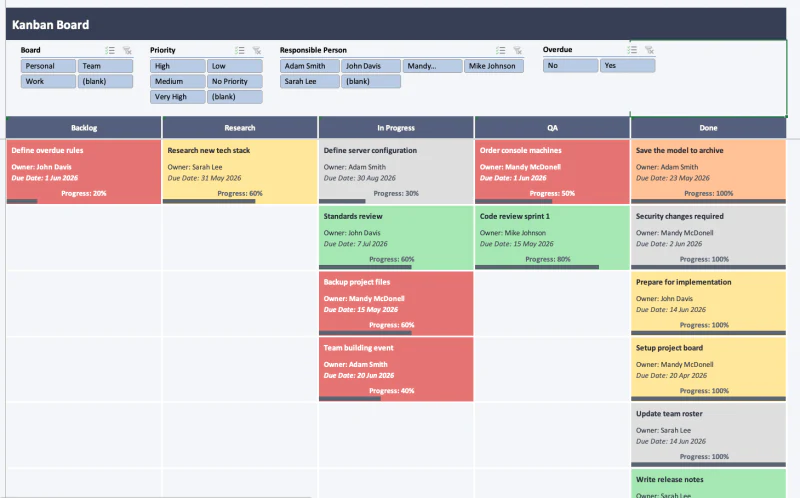
What is the Excel Kanban Board?
A fully functioning Kanban board built entirely in Excel. Columns hold your stages — To Do, Doing, Done, or whatever your process actually looks like — and every task sits in its own card. There are no add-ins and no macros: the whole board is driven by formulas. It also handles calendar layouts and an at-a-glance overview dashboard.
Want to understand or build the system yourself? Read how to make a Kanban board in Excel that actually works, including the source-table structure, formula direction, design decisions, and an honest comparison with dedicated project-management apps. You can also browse the Excel project-management template collection.
What's included
- A fully working Kanban board with a card for every task
- An overview dashboard for at-a-glance analysis
- A calendar page
- Filters to slice the board by board or by person
- Editable settings — set your own stages, boards, and people
- 100% formula-driven: no macros, add-ins, or dynamic-array functions
How it works
Pick a board or a person on the slicer and the board rebuilds itself: AGGREGATE works out which tasks match and INDEX/MATCH pulls them into the right column — all without a single dynamic-array formula, which is exactly why it still runs on Excel 2013. Add your tasks, set your stages, and edit the settings to fit the way your team actually works.
Who it's for
Anyone who wants a simple, self-contained place to track a team's tasks — without onboarding to a whole SaaS platform like Trello just to get a basic board.
Excel compatibility
Works in Microsoft Excel 2013 and newer on Windows, and Excel 2016 and newer on Mac. The whole board is driven by formulas — no macros, no add-ins, and no dynamic-array functions — so it runs on older versions too. Built for Excel, not Google Sheets.